Data center cooling, installed and supported by technicians and engineers
Yes, we have a dedicated team of cooling technicians and refrigeration engineers who install new cooling systems in data centers and keep existing ones running. Whatever you are standing up or need fixed, one team sizes the equipment, installs and commissions it, and supports it afterward, so the room holds its setpoint and the racks stay online.
What cooling equipment do you install and support?
All of it. If it moves heat out of a data hall or a server room, our engineers can specify and install it and our technicians can maintain and repair it. We work on the room you are building out today and on the equipment a previous contractor left you, and we are candid at the survey about which units are worth keeping and which are at the end of their life.
We cover the full cooling train, from the air handlers in the aisle back to the chillers and condensers on the roof, including the pumps, piping, and controls that tie them together. You get one vendor for the whole system rather than a different number for each box.
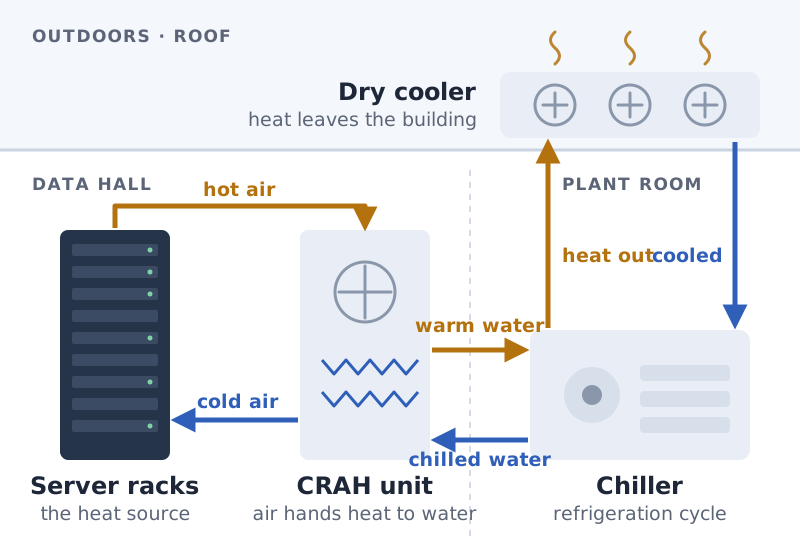
The cooling chain: heat leaves the racks as hot air, the CRAH hands it to chilled water, the chiller moves it up to the roof, and the dry cooler rejects it outdoors. We install and service every link.
CRAC and CRAH precision air-conditioning units
Chillers, dry coolers, condensers and condensing units
In-row and in-rack close-coupled cooling
Rear-door heat exchangers and liquid-to-chip cooling loops
Computer-room humidity control, free-cooling and economizers
Pumps, CDUs, refrigerant and chilled-water piping, and the controls over them
Do you install new systems or only repair them?
Both, and usually the same team does both. On a new build or an expansion, our engineers size the cooling to the rack load you expect, lay out the units for the airflow you need, coordinate the piping and electrical, and commission and load-test the system before it carries live equipment.
On an existing room, we take over support of whatever is already installed. We diagnose the actual fault before quoting, carry common compressor, fan, valve, and control parts, and tell you plainly when a repair is the right call and when a unit should be replaced instead of nursed through another summer.
What does a cooling survey cover?
Every install and every takeover starts with a survey, because a cooling design is only as good as the numbers under it. An engineer walks the room and the plant, measures what is actually happening rather than what the drawings say, and writes up what we found before anyone prices equipment.
Current and planned IT load per rack, in kilowatts
Every existing unit: type, capacity, age, refrigerant and condition
Rack-inlet temperatures and hot spots across the room
Airflow paths: containment, blanking panels, floor tiles and cable cutouts
Redundancy today, and what one unit going down would actually do
Heat-rejection path, roof or plant space, power and condensate drainage
A team of technicians and engineers
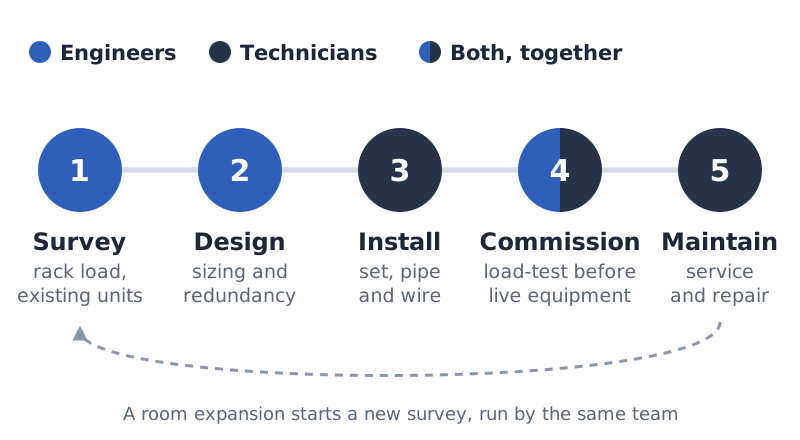
The two roles do different work and you get both. The engineers handle the thinking that happens before a wrench is turned: the heat load, the redundancy scheme, the equipment selection, and the controls strategy that keeps the room stable as load changes. The technicians handle the install, the commissioning, and the hands-on maintenance and repair after it is running.
Because the people who designed the system also support it, nobody is reverse-engineering someone else's drawings when a unit faults at two in the morning. The team already knows how your room is built.
Engineers own the survey and the design, technicians own the install and the maintenance, and commissioning is done together.
How do you keep a data center online?
Cooling failure in a data hall is measured in minutes, not days, so support is built around keeping the room within tolerance rather than just fixing what broke. We plan for a unit to fail and for the room to ride through it.
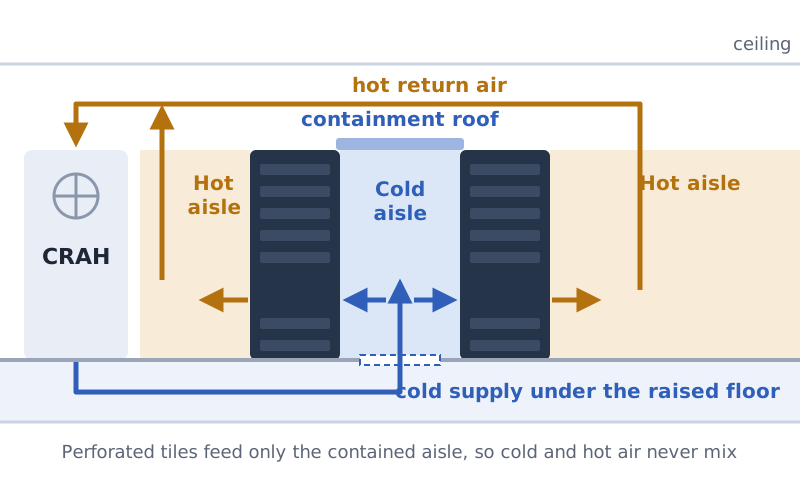
Most cooling problems in an existing room are airflow problems, not capacity problems. When hot exhaust leaks back over the top of a rack or through empty rack spaces, the servers breathe their own heat and the cooling units get pushed colder to compensate. Containing the cold aisle, filling empty rack spaces with blanking panels, and sealing cable cutouts in the floor keeps supply and return air apart, which usually lowers inlet temperatures and energy use at the same time.
Redundancy is designed to what the room needs and then tested, not assumed. N+1 means one more cooling unit than the load requires, so any single unit can be down for service or a fault without the room overheating; 2N means a complete second system. We confirm the room actually holds temperature with a unit switched off, rather than trusting that the spare will pick up.
Cold-aisle containment keeps the cold supply and the hot exhaust apart, so the cooling units do not have to over-cool the room to make up for the mixing.
Preventive maintenance on a schedule, not a reaction to an alarm
Redundancy checked so one unit down does not take the room with it
Refrigerant, chilled-water, and airflow readings trended over time
Emergency callout for a cooling fault that threatens uptime
Faults documented with the cause and the parts, per unit
What does ongoing support include?
A maintenance agreement keeps the small faults from becoming outages. We run scheduled visits that check the things that quietly drift out of spec, calibrate the controls, and catch a weakening compressor or a clogging coil before it strands the room.
Between visits, a cooling emergency reaches a team that already knows your equipment. Each repair is closed out with the fault found and the parts replaced, which is the record you need for the facility file and for whoever signs off on uptime.
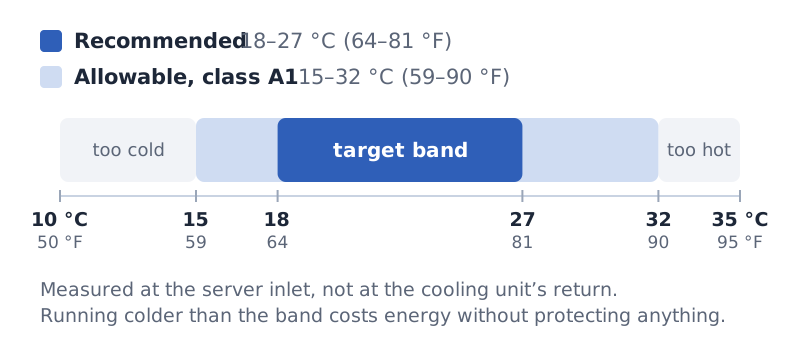
We calibrate to the server, not to the thermostat. ASHRAE's thermal guidelines for data processing environments (TC 9.9) recommend 18–27 °C (64–81 °F) at the server inlet for class A1 equipment, and allow 15–32 °C (59–90 °F). Many older rooms run far colder than they need to; bringing setpoints into the recommended band, measured at the rack inlet, is often the cheapest efficiency gain a room has.
ASHRAE TC 9.9 thermal guidelines for class A1 equipment, measured at the server inlet.
Filter, belt, coil, and refrigerant-charge checks on a set schedule
Leak detection on refrigerant and chilled-water circuits
Control and setpoint calibration as rack load changes
Priority emergency response for uptime-critical faults
Which areas do you cover?
We work across the four boroughs that hold most of the city's server rooms and data halls, from a single telecom closet to a full raised-floor room. A site split across more than one building is normal for us.
Heat rejection on a city roof: dry coolers on steel dunnage, serviced under lockout with fall protection.
Manhattan
Brooklyn
Queens
The Bronx
Questions Property Managers Ask First
7
Can you design and install a cooling system for a new server room?
Yes. Our engineers size the cooling to your expected rack load, lay out the units for the airflow the room needs, coordinate the piping and electrical, and commission and load-test the system before it carries live equipment.
Will you support cooling equipment another contractor installed?
Yes. We take over support of whatever is already in the room, diagnose the actual fault before quoting, and tell you plainly when a unit is worth repairing and when it should be replaced.
What types of cooling can you actually work on?
The full range found in data centers: CRAC and CRAH units, chillers and condensers, in-row and in-rack cooling, rear-door heat exchangers, liquid-to-chip loops, humidity control, and the pumps, piping and controls that connect them.
How fast can you respond to a cooling failure?
Cooling faults that threaten uptime are prioritized because a data hall overheats in minutes, not days. Call with the site and the symptom and you get a dispatch window on that call, not a callback.
What temperature should a server room be kept at?
ASHRAE's guidelines recommend 18–27 °C (64–81 °F) at the server inlet for most IT equipment (class A1). We measure at the rack inlet rather than at the cooling unit's return, and set the room to hold inside that band with margin for a unit being down.
Do you offer a maintenance agreement?
Yes. Scheduled preventive maintenance keeps the small faults from becoming outages, and between visits a cooling emergency reaches a team that already knows how your room is built and what is installed in it.
Do you only cover large facilities?
No. We work on everything from a single telecom closet or server room to a full raised-floor data hall, and on sites split across more than one building.